The result
Daily, weekly and monthly views backed by Supabase authentication and Postgres.
A single view from weekly goals to daily review
Personal project · private-use dashboard
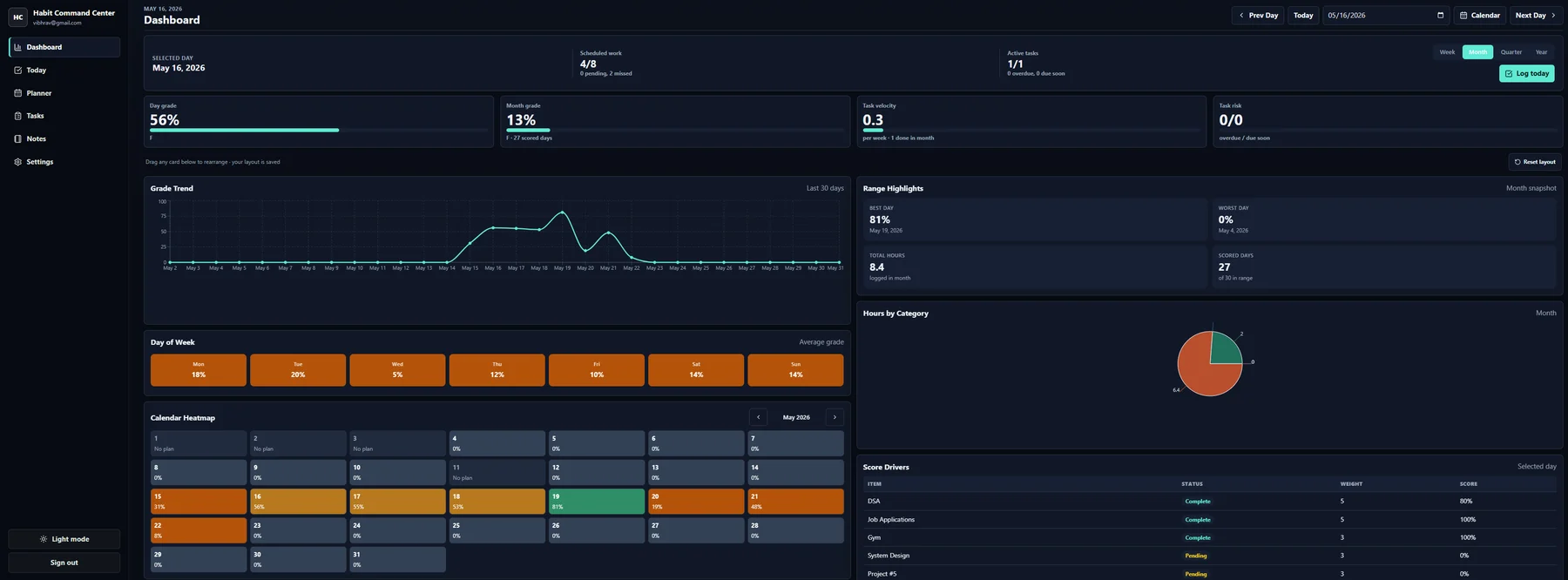
Connected weekly goals with daily execution through one dashboard for habits, logs, tasks and weighted review, backed by Supabase authentication and Postgres.
From the repository
Habit Command Center is a private planning and execution dashboard for turning weekly goals into daily action. It combines habit scheduling, task tracking, weighted scoring, extra work logging, and progress analytics in one focused Next.js app.
The product is built for a personal operating system workflow: plan the week, execute today, review the signal, and adjust the system without losing historical context.
Plan the week in the Planner. Schedule recurring habits and deadline-based tasks across a seven-day grid.
Execute from Today. Log scheduled work, mark items complete or missed, add actual counts or hours, and capture extra unscheduled work.
Review progress on the Dashboard. See the selected day's completion signal, daily/weekly/monthly grades, task risk, heatmap performance, and time by category.
Manage commitments in Tasks. Create tasks with start dates, deadlines, priorities, status, and optional habit/category links.
Tune the system in Settings. Create and edit trackable items, customize targets and units, set priority weights, deactivate old items, and export private data.
Only scheduled work affects the base score. Each scheduled item contributes according to its priority weight.
planned_score = sum(item_score * item_weight) / sum(item_weight)
Unscheduled extra work is tracked separately and can add up to 5 bonus percentage points.
Pending planned items behave differently by date:
app/                  Next.js routes and global styles
components/           Main application UI
lib/                  Date, scoring, seed, Supabase, and type utilities
supabase/migrations/  Database schema and RLS policies
The original static prototype files are kept for reference, but the production app is the Next.js + Supabase implementation.
Install dependencies:
npm install
Create .env.local from .env.example and fill in the required values:
NEXT_PUBLIC_SUPABASE_URL=your-supabase-project-url
NEXT_PUBLIC_SUPABASE_PUBLISHABLE_KEY=your-publishable-key
# Or use NEXT_PUBLIC_SUPABASE_ANON_KEY if your project only has a legacy anon key.
APP_ALLOWED_EMAILS=your_email@example.com
Run the development server:
npm run dev
Open http://localhost:3000.
npm run lint
npm run typecheck
npm run build
Run the migration in Supabase SQL Editor or through the Supabase CLI:
supabase/migrations/202605150001_initial_schema.sql
The migration creates the private habit, task, plan, log, category, and weekly note tables with row-level security policies.
Google sign-in uses Supabase Auth's Google provider. Do not enable Supabase OAuth Server for this use case unless Habit Command Center needs to act as an identity provider for other third-party applications.
In Supabase:
https://your-vercel-domain.vercel.app/auth/callback
http://localhost:3000/auth/callback
In Google Cloud:
https://your-supabase-project-ref.supabase.co/auth/v1/callback
Use the exact callback URL shown in the Supabase Google provider screen.
NEXT_PUBLIC_SUPABASE_URL=your-supabase-project-url
NEXT_PUBLIC_SUPABASE_PUBLISHABLE_KEY=your-publishable-key
# Or use NEXT_PUBLIC_SUPABASE_ANON_KEY if your project only has a legacy anon key.
APP_ALLOWED_EMAILS=your_email@example.com
npm run build automatically.This app is designed for private personal data. Do not commit real environment files, database exports, spreadsheets, keys, or generated backups.
Use .env.example as the public template and store production secrets only in Vercel and Supabase.
Continue exploring · 34 projects

Fullstack
ML & AI

ML & AI
ML & AI
Distributed Systems
Fullstack
ML & AI
Distributed Systems
Distributed Systems
Distributed Systems
Distributed Systems
Data Engineering
Data Engineering
Data Engineering
Data Engineering
Data Engineering
ML & AI
ML & AI
Data Engineering
Fullstack
FullstackViewing
Fullstack
Fullstack
Fullstack
Data Engineering
Computing Foundations
Fullstack
Fullstack
ML & AI
ML & AI
ML & AI
ML & AI
ML & AI
ML & AI